

Welcome to the PayDues platform! Whether you’re a small business owner, event organizer, or community leader, PayDues (accessible at dashboard.paydues.ng) makes it easy to collect payments, run voting campaigns, and manage events—all without needing a full website. Our dashboard is designed for seamless setup, with tools like Payment Links for quick transactions, Voting Links for engaging campaigns, and Event Ticketing for organized gatherings.
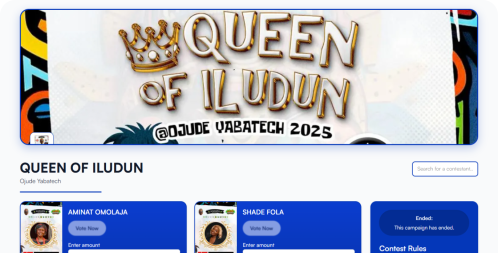
Creating a Voting Link: Engage and Monetize Campaigns (In-Depth Focus)
Voting Links are dynamic tools for running polls or contests: “Create a personalized URL to collect paid or free votes and track real-time results. Perfect for elections, contests, awards— with flexible monetization.”
With Nigeria’s vibrant community events, Voting Links power everything from beauty pageants to student elections. Focus here as requested—we’ll emphasize preparation for contestants, categories, pricing, and timelines.
Use Cases for Voting Links
Versatile for engagement and fundraising:
- Awards and Dinners: Vote for “Best Employee” or “Top Innovator” at corporate dinners/award nights.
- Campus/Department Elections: Elect faculty execs, student union leaders, or “Most Popular Lecturer.”
- Pageants and Competitions: Beauty contests, talent shows, or community awards (e.g., “Best Dressed” categories).
- Audience Choice Events: TV shows, music polls, or fan-voted MVPs in sports.
- Fundraising Polls: Paid votes for charity (e.g., “Vote for Your Favorite Cause” with proceeds donated).
- Internal Votes: Free polls for clubs/associations (e.g., “Next Meeting Topic”).
In Nigeria, use for cultural festivals (e.g., voting in Eyo or Argungu festivals) or tech hackathons.
Things to Consider Before Creating a Voting Link
Voting campaigns require more prep than payments—plan to avoid issues like bias or low turnout:
- Prepare Contestants: List all participants in advance. For each: Name, High-quality image (square, 500x500px+), Description (bio/achievements). Aim for 5-20 contestants; too many dilute votes.
- Categories (if applicable): For structured votes (e.g., awards), define categories like “Best Student,” “Most Innovative.” Assign contestants to one category. This prevents cross-voting chaos.
- Pricing and Monetization: Decide vote cost—Free (engagement), Fixed (e.g., ₦100/vote for fundraising), or Voter-Defined (donations). Allow multiplication? (Buy 10 votes at once.) Who pays fees—you or voter?
- Time Frame: Set Start/End Dates (e.g., open for 7 days). What if it expires mid-vote?
- Rules and Limits: Multi-contestant voting? (Vote for multiple people.) Custom fields for voters (e.g., “Voter ID” for verification). Limit votes per person? (Anti-fraud.)
- Results and Transparency: Show live results? (Motivates voters.) Prepare for exports (CSV for audits).
- Promotion and Legal: Market via social/email. Disclose if votes are binding. For paid votes, note no refunds. Test for biases (e.g., image quality affects clicks).
- Branding: Logo/banner for professionalism. Budget for ads to boost participation.
Pro Tip: Run a test campaign with friends. Ensure diversity in contestants for fair play.
Step-by-Step Guide to Creating a Voting Link
Go to “Voting Links” > “Create.” Choose Standard (simple list) or Categorized.
- Campaign Setup:
- Title (e.g., “End of Year Awards 2024”) and Description (engaging overview).
- Set Start/End Dates. Custom URL for sharing.
- Vote Cost Configuration:
- Free: Open polls.
- Fixed: Set ₦/vote; allow multiples.
- Voter-Defined: Flexible amounts.
- Adding Contestants:
- One by one: Name, Image, Description.
- If Categorized: Assign to categories (pre-define in setup).
- Voter Details:
- Add custom fields (e.g., “Email” required for uniqueness). (Optional)
- Live Results:
- Toggle visibility. Hide for suspense. (Make results visible to drive the hype and get the contest going. When contestants see their opponents winning, it motivates them to keep going.)
- Branding and Publish:
- Upload logo/banner.
- Save draft, then publish. Monitor in “Results” tab.
Managing: View leaderboard, revenue, logs. Export voters. Pro Tip: Announce winners post-expiry for drama. If the results were made live, everyone should already know their winner before you announce.